Trading futures today is expensive and cumbersome
If you trade a funded account, at least one of these probably happens to you.
- ×01
You pay for data twice
Your account already includes CME data in NinjaTrader. But to see it in a modern charting app you have to pay for it again, month after month.
- ×02
Slow, outdated charts
NinjaTrader executes well, but its charts feel like they're from another era: slow to change timeframe, cluttered and hard to set up.
- ×03
Five programs to trade
One to chart, another to execute, another for alerts, another to practice. Windows everywhere and a subscription for each one.
- ×04
Plans that won't let you cancel
Trials that silently turn into annual plans, basic features behind paywalls and support that's just a chatbot.
What is TQ Charts: a suite built from the trader’s seat
TQ Charts is charting software for Windows that connects to NinjaTrader 8 and uses its real-time data, without paying for it again. It brings fast charts, orders on the chart, an automatic journal, a copy trader for prop firm accounts and Pine Script indicators into one app. It works with Rithmic, Tradovate or CQG, on your PC or on a VPS.
I designed TQ Charts as the answer to every problem I had trading futures: too many windows, drawings I had to repeat, separate journals and expensive copiers. Here it all is, together.
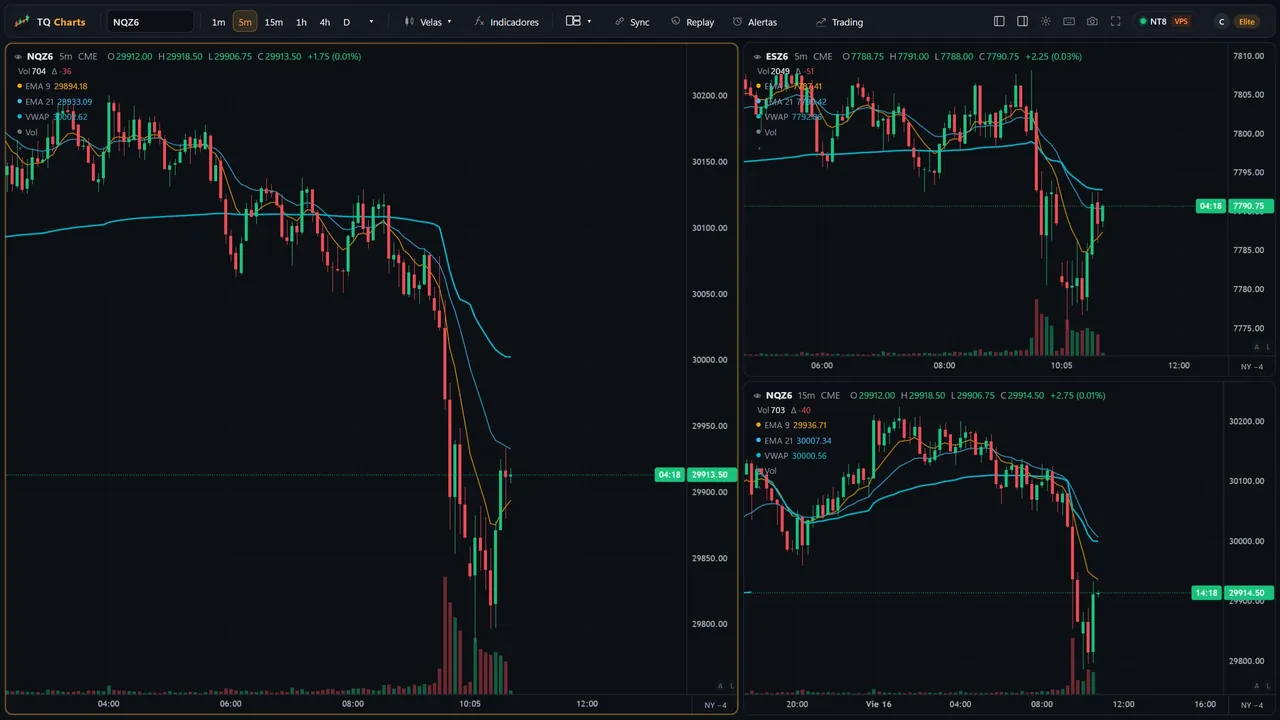
Analyze and execute on the same chart
Brackets, limit orders and positions are placed and moved right on the candles, with TP, SL and breakeven in view.
NQ and MNQ, in sync
A level or zone you draw on NQ shows up instantly on MNQ, and the other way around. Analyze on one and trade whichever you want.
Your journal, no exporting
Every trade on your accounts is logged with its result, so you can review what works and what does not.
All your accounts, one order
You trade the master and your funded accounts copy it. No separate copier to pay for.
An interface that stays out of your way
Our own chart engine, fast and clean. Every menu and window designed for trading without distractions.
Zero extra data cost
TQ Charts uses your NinjaTrader session, on your PC or your VPS. Prices go straight from your NinjaTrader to your screen: they never pass through our servers.
Switch timeframes. No waiting.
This is how the TQ Charts engine feels. Tap a timeframe and see how long it takes to redraw, measured in your own browser.
Demo data. In the app, it is yours.
Futures charting features: made for NQ and ES traders
The tools you use every day, with no add-ons or hidden costs.
Up to 8 charts
Multi-chart layouts with synced symbol, timeframe, crosshair and time.
Bar Replay
Replay any session candle by candle to practice your setup without risking the account.
PROMobile alerts
On price, drawings or indicators. Notifications to Telegram, Discord or your own webhook.
Your Pine scripts
Paste your Pine Script indicators and use them in TQ Charts, with their inputs and styles.
PROICT concepts included
FVG, BPR, equal highs and lows and sessions/killzones, ready to use.
Volume profile and VWAP
Volume profile and VWAP anchored wherever you want, with alerts on their levels.
Ticks, volume and range
500T, volume or range candles, and 15- and 30-second charts.
ELITETrading mode
Your funded accounts, master/follower roles and bracket tickets from the chart.
FreeHow to connect TQ Charts to NinjaTrader: ready in under 5 minutes
Download TQ Charts for Windows, open it and the app installs a small add-on in NinjaTrader 8 by itself. With NinjaTrader open, your charts fill with your real-time data. If NinjaTrader runs on a VPS, you link it with a code. The Free plan needs no sign-up.
No tech skills needed. The app does the setup for you.
Download and install
Download TQ Charts for Windows and use it free, without signing up. Whenever you want, create your account and try Elite for 14 days, no card.
Link NinjaTrader
The app installs a small add-on in NinjaTrader by itself. If NinjaTrader runs on a VPS, you link it with a code.
Trade with clarity
Your charts fill with your real-time data. Set up your layout and alerts, and start trading.
Your setup today vs. TQ Charts
Fewer windows, fewer subscriptions and no paying twice for the same thing.
| Your setup today | With TQ Charts | |
|---|---|---|
| CME data | You pay for it again in your charting app | Your NinjaTrader's, at no extra cost |
| Charts | Slow in NinjaTrader or in a separate app | Fast, modern and in the same app |
| Practice with replay | Another tool or another paid plan | Included from the Pro plan |
| Mobile alerts | Separate integrations | Telegram, Discord and webhook included |
| Your funded accounts | Jumping between windows | All visible in Trading mode |
| Cancel | Chatbots and surprise renewals | One click from the app, whenever you want |
TQ Charts pricing: a fair price, no fine print
TQ Charts has a Free plan forever, with no sign-up. Pro costs $19 a month or $190 a year, and Elite $39 a month or $390 a year. When you create your account you try Elite for 14 days with no card. Pay with PayPal, card or crypto and cancel in one click from the app.
Use it free without signing up. Create your account and try Elite for 14 days; then you choose: stay free or move to the plan you need.
I trade NQ and ES with funded accounts. I was paying for data twice, had five windows open, and NinjaTrader's charts froze right when I needed them most.
I built TQ Charts for myself: fast, clean and connected to the account I already had. Now I'm sharing it with traders who have the same problem.
Questions? Here are the answers
What do I need to use TQ Charts?
Windows 10 or 11 and NinjaTrader 8 with your data connection (your funded account's or your broker's). TQ Charts installs a small add-on in NinjaTrader and connects by itself. It also works if NinjaTrader runs on a VPS.
Do I have to pay for market data separately?
No. TQ Charts shows the data you already receive in your NinjaTrader. Without NinjaTrader you can view data delayed by ~10 minutes to get to know the app.
Do my data or trades pass through your servers?
No. Prices, charts, drawings and accounts stay on your PC. Our servers only handle your TQ Charts account and your subscription.
How does the free trial work?
The Free plan requires no sign-up. When you create your account you get 14 days with every Elite feature, no card. When it ends, the app switches to the Free plan unless you choose another. We never charge you without your decision.
On how many PCs can I use it?
Your account works on 2 devices at once, for example your desktop PC and your laptop. You can switch devices from «My account» in the app.
Does TQ Charts have a copy trader for NinjaTrader 8?
Yes, it is built in. You trade your master account and your other NinjaTrader accounts copy every order, with no separate copier to pay for. The Free plan copies 1 live or funded master to 1 Sim account, Pro copies up to 5 accounts and Elite all your accounts.
Can I use my TradingView indicators?
Yes. Paste the Pine Script code and use it in TQ Charts. The Free plan keeps up to 3 indicators, and Pro and Elite have no limit. Most Pine functions are supported.
How can I pay?
With PayPal, with a credit or debit card (through PayPal, no account needed) or with crypto such as BTC, ETH or USDT. With PayPal or card the subscription renews automatically; with crypto you pay 1 month or 1 year in advance.
How do I cancel?
From the app: My account → Manage subscription, or in PayPal → Automatic payments. No calls needed. You keep your plan until the end of the paid period. If you paid with crypto there is nothing to cancel: it does not renew on its own.
Join the TQ Charts Discord
News from every release, feature ideas and direct help from other futures traders.
All your trading in one app
Analyze, execute, copy and log your trades in one place. Download it free, no sign-up, and try every feature for 14 days. No card.
Download TQ Charts for freeYour download has started
- Open TQ-Charts-Setup.exe from your downloads.
- If Windows shows «Windows protected your PC», click More info and then Run anyway. This is normal for new apps.
- Open TQ Charts and follow the steps to connect your NinjaTrader.
Download didn’t start? Download it here
TQ Charts is for Windows
Open tqcharts.com on your PC to download it. It works on Windows 10 and 11.